
The soil survey, the drainage invoice, the spray recommendation, the photos from the wet corner. Drag them onto the field they belong to and that’s where they stay. Click one and it opens in whatever normally opens it. No more working out which folder you filed it under in 2019.
A farm office drive that has been growing for fifteen years. Soil surveys under a year, or under a field, depending on who saved them. The drainage report in a contractor folder, or possibly still in an email. The stewardship agreement printed in the cabinet, and also somewhere in three subfolders in two versions, one of which is current.
None of that is untidiness, because every one of those files was put somewhere sensible on the day it turned up, by somebody who couldn’t yet know which of the two obvious homes would turn out to be the one that mattered. Nothing is actually lost either. It’s just that finding it takes ten minutes you don’t have in September, so you make the call from memory instead. And memory is the one copy nobody backs up.
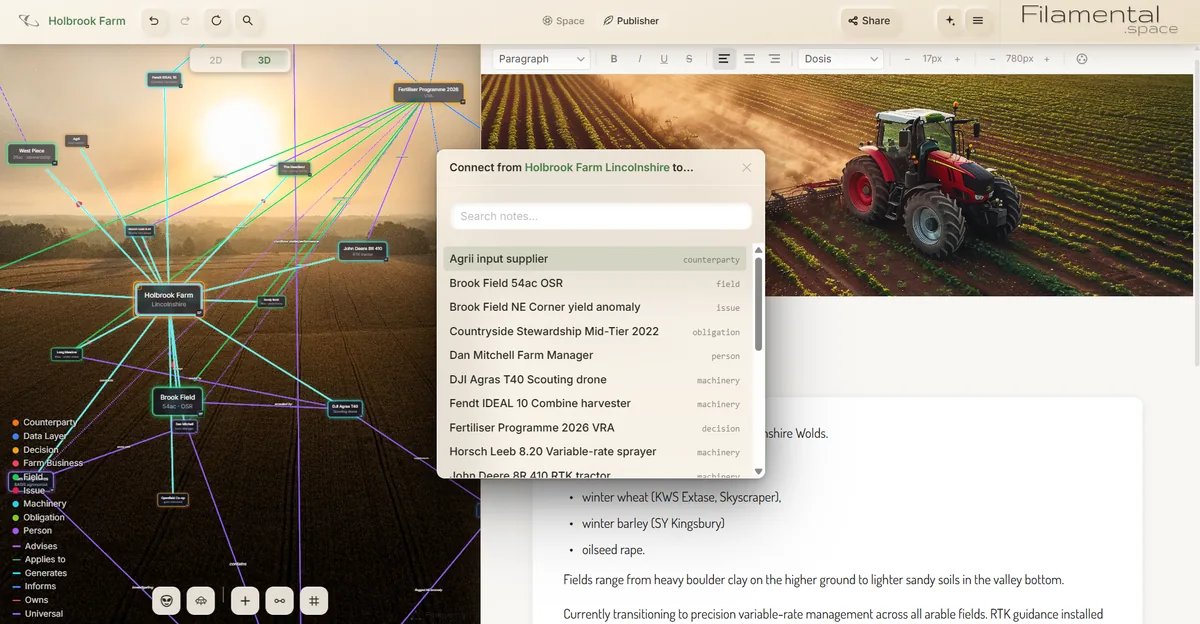
Every field, machine, adviser, contract and scheme is a node you can put things on. Drop a file onto one and it attaches, as many as you like, sitting alongside whatever notes you have written there. Click it and it opens in Acrobat or Excel or your photo viewer, exactly as it would from a folder. Nothing is converted, and nothing is trapped in a format only we can read. If you would rather the document were a thing in its own right, drop it in as a node instead and it takes a position next to what it relates to.
You’re asked each time whether to copy or move. Copy leaves your folders exactly as they are, which is the safe way to start. Move takes the file out of the tree, which is how the shared drive slowly gets smaller instead of larger.
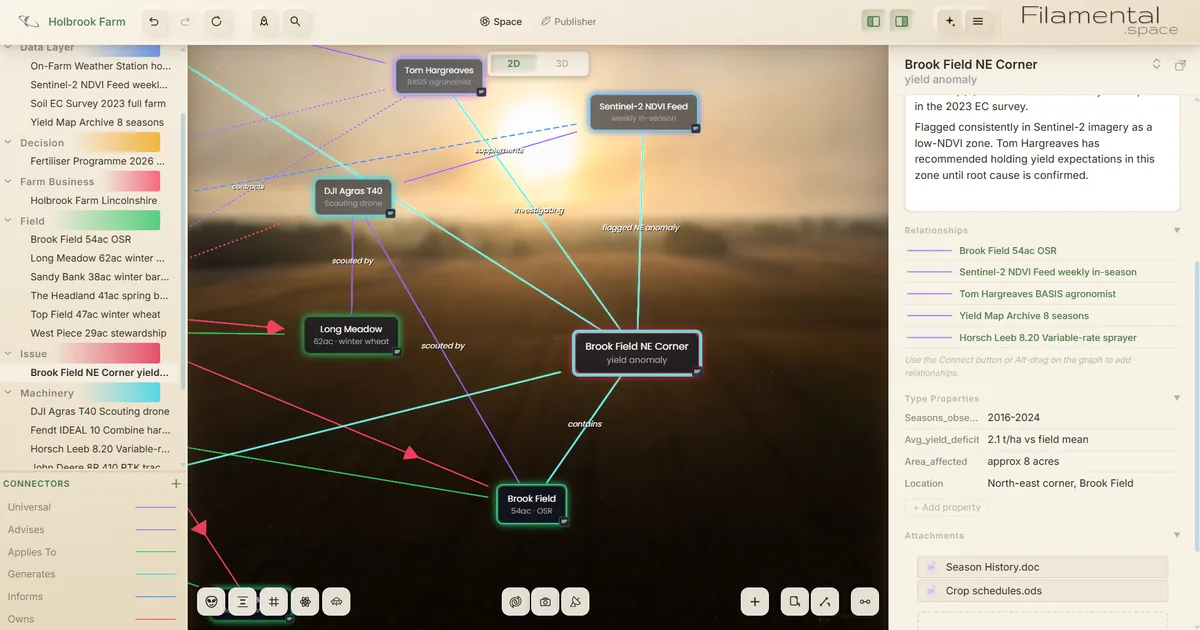
Then there’s the part a folder can’t do. Brook Field is joined to the agronomist who walks it, the combine that yield-maps it, the contractor who did the drainage and the stewardship scheme that binds part of it. Open any one of those and the rest is one click away, because the connection is a real thing rather than something you remember.
Six fields on the Lincolnshire Wolds, from heavy boulder clay on the high ground to light sand in the valley. The combine, the sprayer, the scouting drone. A soil conductivity survey, weekly satellite imagery in season, eight years of yield maps. An agronomist, an input supplier, a grain merchant, and a five-year stewardship agreement tied to a particular 29 acres.
Brook Field's north-east corner has come in around 2.1 tonnes a hectare under the field mean since 2016. Everything anybody has ever found out about it now lives on that one node: the 2019 drainage works and the invoice for them, the survey showing where the clay gives way to sand, the imagery flagging it as low-vigour every year, the agronomist's written note to hold expectations there, and the three explanations still in the running.
Nobody had to build that. It accumulated, because each time something arrived it went onto the corner it was about rather than into a folder named after the month. The next person to ask why that corner is poor gets fifteen minutes of reading instead of an afternoon of searching, or a shrug.
No account, no sign-in, no license portal, no sync client, no migration and nothing to import. You point it at a folder on your own machine and it reads what is there. Your notes are saved as plain text files, your attachments are the actual files, and if you open that folder in Windows Explorer it looks like a folder, because it’s one.
You already run enough software somebody else controls. Stop using this tomorrow and every document is still sitting where you can see it, in a format anything can open. It won’t file your returns or hold spray records for an inspector either, and isn’t trying to. Keep whatever does that, because this is for the part nobody sold you software for.
A farm runs on a lot of people who each see part of it. The agronomist knows why the nitrogen was split on the light land. The drainage contractor knows what he actually found when he dug. The manager knows which gateway floods and which field lodges in a good year. Most of that has never been written down anywhere, and it leaves when they do.
Putting it against the field it concerns is a small habit that pays back at the moments that matter: a new manager starting, a farm changing hands, an agent asking about ground nobody has walked in a while. And when somebody outside does need to see it, a space can be sent as a link or a single file that opens in an ordinary browser, attachments included. They install nothing and pay nothing.
You don’t begin with a blank screen. A Template is a starting vocabulary, the kinds of thing that exist in a job and the ways they relate, so the categories are already there and already coloured when you make a space.
A starting point, not a schema you’re stuck inside. Rename a category, add one, delete the ones you never use. Nothing stops you using more than one in a space.
Everything on this page is on the free plan. No account, no card, no trial running out, no feature quietly withheld until you upgrade. Attachments aren’t limited and never will be.
Spaces are unlimited and the bridges between them are free, so a farm becomes a few linked spaces rather than one enormous one: fields in one, machinery and data in another, stewardship and contracts in a third, all joined and all navigable. Each holds twenty nodes, which is about where you would want to start a new one anyway.
The paid tier is $120 a year, or $12 a month, and buys exactly one thing: sending a space to somebody who doesn’t have Filamental. Useful at a handover or a rent review, irrelevant the rest of the time. We would rather say so than sell you something you won’t use.
Yes, and it’s the main thing farms use it for. Drag any file onto a node and it attaches alongside that node's notes, as many as you like. Click one and it opens in whatever program normally opens it. You can also drop a file in as a node of its own, so it takes a place in the space next to what it relates to.
Only if you want to. When you drop a file in, Filamental asks whether to copy it or move it. Copy leaves your folders exactly as they are. Move takes the file out of the tree, which is how the shared drive gradually gets smaller instead of larger.
Not directly, and it doesn’t need to. Those platforms hold the prescriptions, the logged passes and the imagery, and they’re good at it. What goes into Filamental is the documents and the reasoning that sit around them. Export a report from any of them and attach it to the field it belongs to.
It’s a folder on your own computer. There’s no account, no sign-in, no sync client and nothing to migrate. Notes are saved as plain text files and attachments are the actual files, so you can open the folder in Windows Explorer and it looks like a folder. Back it up the way you back up anything else.
Yes. It is a desktop application for Windows, macOS and Linux that reads files on your own disk. There’s no account to sign in to and no server it needs to reach, so it works the same in a farm office with poor broadband as anywhere else.
For most farms, nothing. The Personal plan is free permanently, with no account and no card, and everything described here is on it, including attachments. The paid tier is $120 a year, or $12 a month, and buys one thing: sending a space to somebody who doesn’t have Filamental. If you never need to do that, you never need to pay.
One field and an afternoon is enough to find out whether this suits how you work. Free, no account, no card, and nothing to cancel if it turns out it doesn’t.