
An n8n workflow, an AI agent or a new CRM can only follow the process it’s given, and most of the process was never written down. Filamental maps which system holds the master copy of each record and which procedures rely on it, in plain files on your own machine.
The CRM holds the customers, accounts holds the invoices, the warehouse system holds the stock, and the price list is a spreadsheet nobody chose but everyone trusts. Each is right about its own data, and none of them knows about the price someone re-keys by hand or the export one person runs on a Wednesday.
People work round gaps like those without noticing. An automation can’t, since it does exactly what it was given and nothing it wasn’t, which makes an accurate account of how the work runs the thing every automation is waiting on.
Systems, records, procedures, roles, controls and documents become nodes. Holds marks the system of record for each record, feeds shows how its copies travel, and uses joins each procedure to what it relies on. Select a system and every connection it has lights up, so what relies on the CRM is one click rather than a meeting.
Each procedure stays a document, a page with its steps written as a numbered list, so nobody has to redraw their SOPs as a flowchart.
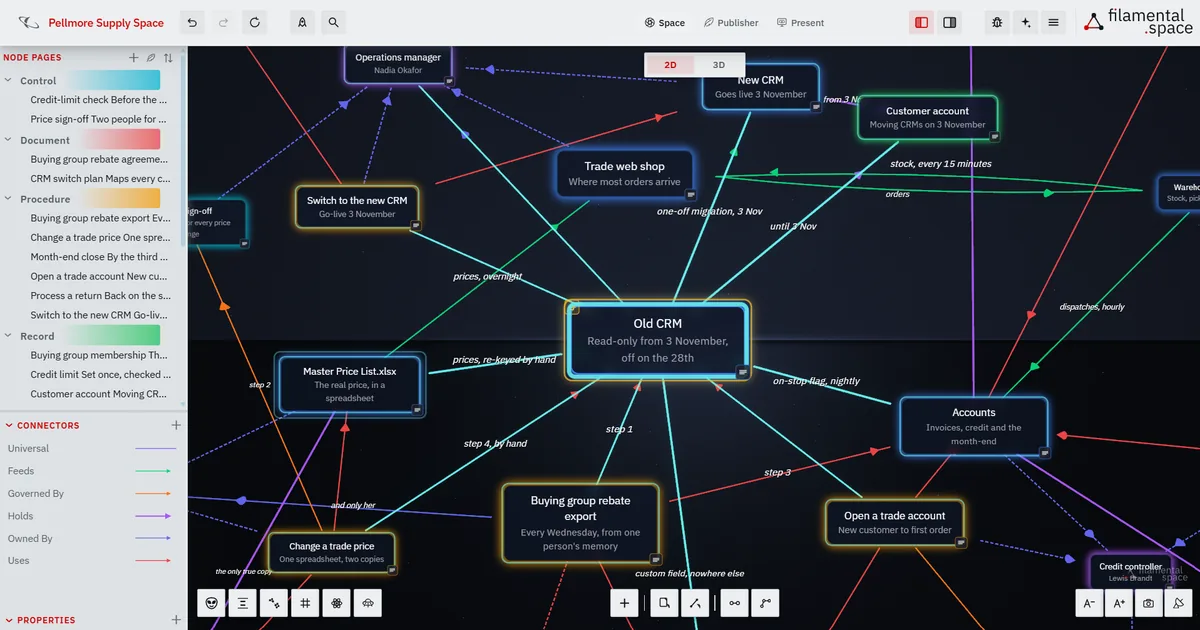
An invented catering and cleaning supplies distributor of about sixty people. The old CRM goes read-only on 3 November and is switched off on the 28th. Select it and its connections light up to the procedures you’d expect, and to one you might not: the buying group rebate export that Maureen, the sales coordinator, runs every Wednesday. Until 9 October it wasn’t written down anywhere, and it still isn’t signed off.
Its first step searches a custom field that only the old CRM holds, and the one row in the switch plan’s field mapping marked Not mapped is that field. From 28 November the export has nothing to run against, and nobody would hear about it until the quarterly rebate payment came in short.
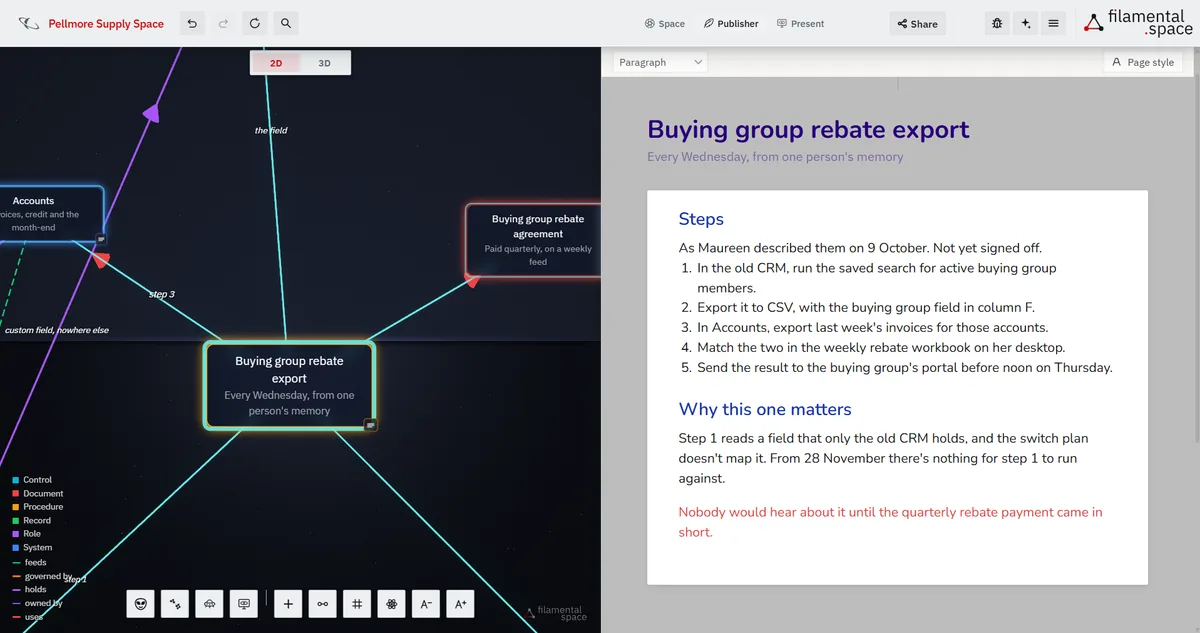
Turn that export into an n8n workflow, or hand the month-end checks to an agent, and the first questions are always the same: what does this step read, what does it write, and who signs it off? On the map they’re already answered, procedure by procedure, with the systems drawn in.
An assistant connected over MCP reads the map directly on your machine, so the brief it works from is the one you keep. Published as a link or a single file, it opens in a browser for the managing director, the implementation partner or a new starter, with nothing to install. The workflow runs the step it’s given, while the reason the step exists stays on the map with whoever drew it.
All of it is on the free plan except where the table says otherwise.
| Feature | On this map |
|---|---|
| Connector types | Holds, feeds and uses are different lines, so the master copy, its copies and the work relying on them read apart. |
| Selection highlighting | Select a system and every connection it has lights up, along with the things at the other end. |
| Pathfinder | Pick two things and the route between them lights, stop by stop, so a copy can be traced to its source. |
| Node pages and wiki-links | A procedure reads as a document, and typing [[Old CRM]] in a step links straight to that system’s page. |
| Properties | How often it runs, whether it’s signed off and when it was last reviewed, as fields on every procedure. |
| Folder exploration | Point the AI you connected at your existing Word and PDF procedures for a first draft of the map. |
| MCP | An assistant reads and updates the same map, on your own machine. |
| Share link and HTML download | One shared link is free; more links and the HTML file are Professional. |
| Plain Markdown | Every procedure is a .md file you can back up, sync or open anywhere. |
A system of record is the authoritative source for a piece of data, the one place a customer account, an invoice or a stock count is held as the master copy. That’s your CRM, your accounts package and your warehouse system. Filamental isn’t one, connects to none of them and holds none of their data, only where it lives and who relies on it.
A Template is a starting vocabulary, so the categories arrive named and ready when you make a space.
Tool & Integration Map, Vendor Management and Risk & Issues sit next door, and any Template can be renamed, extended or combined with another.
A system of record is the authoritative source for a particular piece of data, the one place a customer account, an invoice, a stock level or a price is held as the master copy, and which every other copy defers to. In a small or mid-sized company that’s usually the CRM, the accounts package and the warehouse system, and sometimes a spreadsheet. Filamental isn’t a system of record. It maps which system is the system of record for each record, and which procedures rely on it.
No. Filamental reads and writes Markdown files in a folder on your own machine and never logs in to any other system, so there’s nothing to integrate, no credentials to share and no IT project to start. Each system goes on the map as a node, with the records it holds and the procedures that rely on it, which is the part none of those systems keeps anyway.
Yes, as the description it’s built from. Each procedure is a plain Markdown page with its steps, the systems it uses and who owns it, so whoever builds a workflow, in n8n or anything else, starts from an accurate account rather than an interview. An AI assistant that speaks MCP, such as Claude, can read the map directly on your own machine through Filamental’s local MCP server and write changes back. Filamental doesn’t run automations itself or connect to your other systems.
Yes. Point Filamental at a folder of procedures in Word, PDF, Markdown or plain text, and the AI you connected reads them and builds a first draft of the map, using categories and connectors you approve before it starts. The documents are only read, never moved or changed, the reading runs on your own AI provider or a model on your own computer, and on the free plan it runs to the end however many documents there are. Treat the result as a first draft, since a scanned page has no text to read and tables in a PDF can come out jumbled.
No. There’s no approval workflow, no electronic signature and no controlled versioning, so Filamental won’t stand in for a QMS or keep you inside ISO 9001. Each procedure is a page with its steps written out and fields such as how often it runs and whether it’s signed off, which you set yourself. If you run a QMS, put it on the map as a system, since it holds records like everything else.
Mapping is free permanently, with no account and no card: unlimited projects, twenty nodes each, and bridges between them that don’t count. Professional is $120 a year or $12 a month and adds unlimited nodes in a project, as many shared links as you like, pushing updates to a link already sent, the HTML download and presenting. Whoever opens what you send pays nothing and installs nothing.
One process and the systems it touches is an afternoon’s work. Free, no account, no card, and nothing to connect to anything.