Filamental and Obsidian

Your vault, in three dimensions, without leaving Obsidian

3D Filamental Graph is a community plugin that renders your whole vault as a real physics simulation in an Obsidian tab. Every note is a node, every wikilink is a connection, and notes cluster by how they actually link rather than by where you filed them. Drag one somewhere better and it stays there. No import, no export, no second copy of anything.

Inside Obsidian

A space you move around in, not a picture you look at

The graph opens in an ordinary tab and starts simulating. Nodes repel each other and spring toward what they link to, so the layout settles into the shape of your vault instead of the shape of your folders. Arrow keys pan, ctrl and scroll or a trackpad pinch zooms, a two-finger swipe moves you around, and clicking any node opens that note. The built-in graph view is a picture of your vault that resets every time you open it. This is a place, and it remembers where you put things.

Drag a node somewhere deliberate and the position is saved into the vault itself, so the arrangement you worked out on Tuesday is still there on Friday. Node size scales with how many links a note has, which makes the load-bearing notes obvious without reading a single title. And if the vault already carries Filamental entity types, every node takes its category colour.

There is a sidebar panel showing the active note's type, its colour and its link count, and a button that launches the desktop application with this vault already open. That is the whole plugin. It is desktop only, it is free, and it is in the community plugins list.

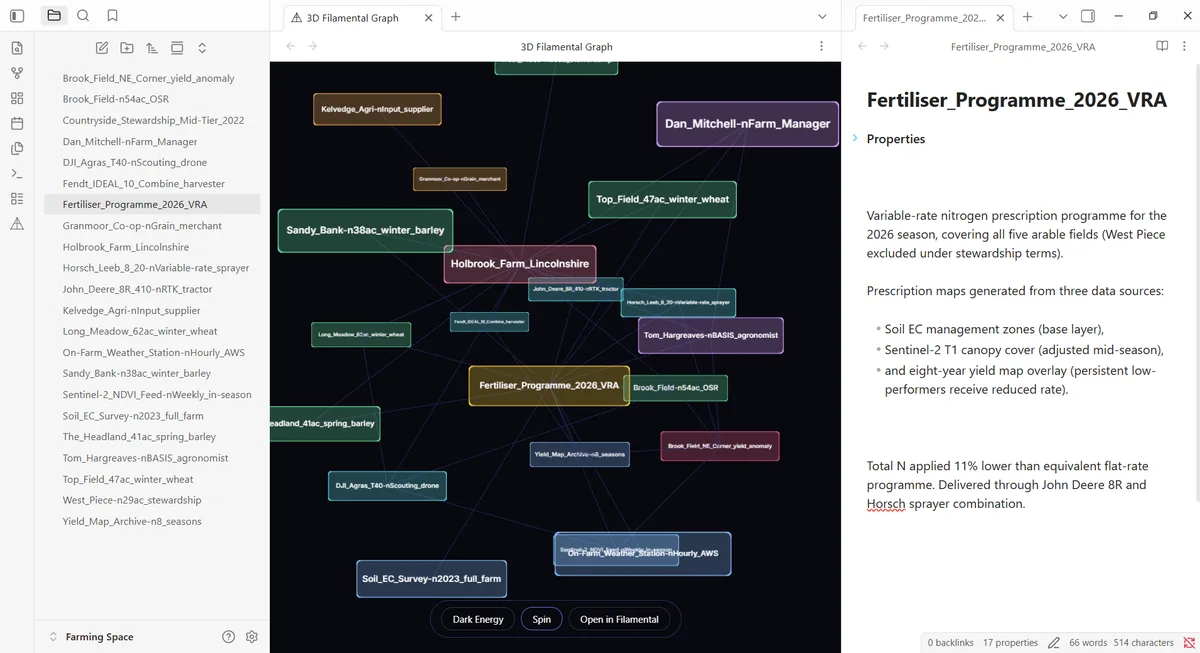
Running in a vault tab Every note in the file list on the left is a node, every wikilink a connection. Nothing was imported and nothing moved.
A vault open in Obsidian with the 3D Filamental Graph running in a tab. Every note in the file list on the left appears in the graph as a node, coloured by its category, joined by the wikilinks between them, with related notes clustered together rather than arranged by folder. A note is open in a side pane beside it, showing a variable-rate fertiliser programme with its properties and its prose. Three controls sit under the graph: Dark Energy, Spin, and Open in Filamental.
What the desktop app adds

The plugin draws your links. The app is where you say what they mean.

A wikilink is a fact about two notes being related and nothing more. That is exactly right for a vault and it is the ceiling of what any viewer can show you, because there is nothing else in the file to draw. The desktop application reads the same folder and adds the layer above it: connections that carry a type you name yourself, a direction and a strength, so supersedes, blocks, reports to and evidenced by stop being one undifferentiated grey line.

With that comes the rest of it. Categories, so a Person and a Decision and a Contract are different colours and different shapes rather than all being notes. Properties, for the structured facts that do not want to be prose. Attachments, so a file sits on the thing it concerns and opens in whatever normally opens it. Themes, for the 3D environment itself. And Publisher, which turns a space into something you can send to a person who has never heard of either application.

Both read the same files at the same time with no conflict, which is genuinely the point: you keep writing in Obsidian, because Obsidian is very good at writing, and the structure work happens next door in the same folder. Nothing is migrated and there is no moment where you have to choose.

Bringing an existing vault across

Your wikilinks become the first draft of the structure

If you want a vault to become a proper Filamental space rather than just be viewed as one, there is a one-time import. It reads every note, matches each [[wikilink]] to the note it points at, and turns each one into a real connection. Links pointing at notes that do not exist are reported rather than silently dropped, which is also a decent way to find out what your vault has been promising itself.

Those first connections arrive untyped and undirected, on purpose. The import knows that two notes are related because you linked them, and it does not know whether one supersedes the other or depends on it, so it declines to guess. Typing them is the work, and it is the work that produces something a folder could never have told you.

This is the only place wikilinks are treated as connections. In ordinary use a wikilink in your notes is a hyperlink you can click, and connections are drawn deliberately, because a link you made while writing a sentence and a relationship you meant to assert are two different claims.

Getting it

Two minutes, and the second half is optional

The plugin. In Obsidian, open Settings, then Community plugins, then Browse, and search for 3D Filamental Graph. That is the name it is listed under, so searching for Filamental on its own may not surface it. Install it, enable it, and click the icon in the ribbon or run the command Open 3D Filamental Graph. It appears in a new tab and starts simulating immediately. There is one setting, which opens the graph automatically when Obsidian starts, and it is off.

The application. Download it free for Windows, macOS or Linux, point it at the same folder, and carry on. No account, no sign-in, nothing to migrate and nothing that leaves your machine. The layout you arranged in the plugin is already there, because both are reading the same positions out of the vault.

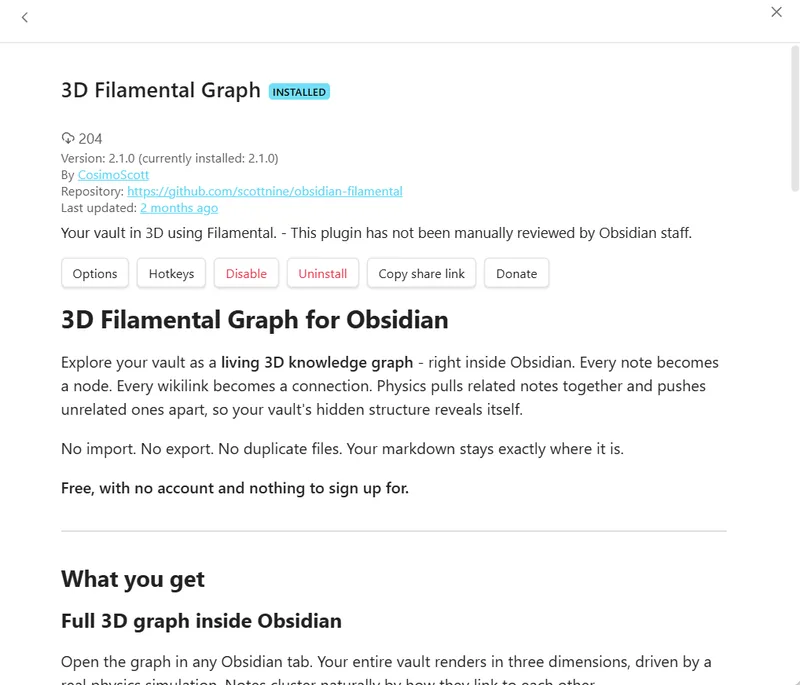
In the community plugin browser Search the community plugins for 3D Filamental Graph. Free, and there is nothing to sign up for.
The 3D Filamental Graph listing inside Obsidian’s community plugin browser, marked INSTALLED, published by CosimoScott, with its version, its repository link and Options, Hotkeys, Disable, Uninstall, Copy share link and Donate buttons. Its description reads that it explores your vault as a living 3D knowledge graph inside Obsidian, that every note becomes a node and every wikilink a connection, and that physics pulls related notes together so the vault’s hidden structure reveals itself. Below that: no import, no export, no duplicate files, your markdown stays exactly where it is, and free with no account and nothing to sign up for.
What it costs

The plugin is free and most people never pay for the rest

The plugin costs nothing and always will, and it is free in the unqualified sense: no account, no trial, no node limit, and no feature switched off until you pay, because there is no paid version of it. What it does not do, it does not do for everybody.

The desktop application has a Personal plan that is free permanently, with no account and no card: spaces are unlimited, the bridges joining them are free, and each space holds twenty nodes, so a vault becomes several linked spaces rather than one enormous one. Everything described on this page above the sending is on it.

On first install you get fifteen days with everything unlocked, so the paid features are something you have actually used rather than a description. When it ends nothing is deleted and nothing is held hostage.

The paid tier is $120 a year, annual only, and it buys exactly one thing: sending a structure to somebody who does not have Filamental. If you are building a vault for yourself, which most Obsidian users are, you will never need it.

Asked before installing

Seven straight answers

Is the Obsidian plugin free, or is there a paid version of it?

The plugin is free with no restrictions. No account, no trial, no node limit, and no feature held back for a paid tier, because there is no paid version of the plugin to sell you. It is deliberately a viewer rather than a cut-down editor: it draws the wikilinks already in your vault, which is the ceiling of what any viewer can do, and it stops there on purpose. The twenty-node limit people ask about belongs to the desktop application's free plan and has nothing to do with the plugin.

Do I need the Filamental desktop app to use the Obsidian plugin?

No. 3D Filamental Graph installs from the Obsidian community plugins list and runs entirely inside Obsidian, rendering your vault as a 3D physics graph in an ordinary tab. The desktop application is a separate free download that reads the same folder, and it adds the things a viewer cannot do: typed connections, node categories, attachments and sending a structure to somebody else.

Does the plugin change my vault or create duplicate files?

Your notes are not touched. There is no import, no export and no second copy, because both the plugin and the desktop application read the Markdown files already in your vault. The only thing written is a .filamental folder holding the positions you drag nodes into, so a layout you arrange is still there next time. Delete that folder and you lose the layout and nothing else.

What is the difference between a wikilink and a connector?

A wikilink says two notes are related. A connector says how, because it carries a type you name yourself, a direction and a strength, so referenced by and supersedes and blocks are different relationships rather than one undifferentiated line. The plugin draws your wikilinks. The desktop application is where you add the typed connections on top, and importing an existing vault turns its wikilinks into connections as a starting point.

Does it work on Obsidian mobile?

No. The plugin is desktop only, on Windows, macOS and Linux, and the Filamental application is a desktop application on the same three. A 3D physics simulation over a whole vault is not something worth pretending about on a phone, and Obsidian marks the plugin as desktop only so it will not appear as an option on mobile.

Will it cope with a large vault?

It will render one, and past a certain density a force-directed layout of a heavily interlinked vault becomes a ball rather than a structure. That is a property of the layout rather than a defect, and it is the same reason Obsidian's own graph view gets less useful as a vault grows. Both work considerably better pointed at one project than at everything you have ever written.

What does Filamental cost for an Obsidian user?

The plugin is free. The desktop application has a Personal plan that is free permanently, with no account and no card, covering unlimited spaces of twenty nodes each with free bridges between them. There is a 15-day full-featured run-in on first install. After that the only paid feature is Publisher, which sends a structure to somebody who does not have Filamental, at $120 a year.

Start inside Obsidian

Install it, open a vault, and see what shape it has been all along

Free, nothing to sign up for, and it does not touch a single one of your notes.

Version
0.3.36
Platforms
Win / macOS / Linux
Personal
Free, permanent
Professional
$120 / year