
The connection runs both ways, and the direction that surprises people is outward. Whatever your Claude has accumulated about a piece of work can leave that window as a structure you can walk around and hand to somebody, rather than as another document. One click in Settings, free on every plan, and the files stay on your own disk.
Prose in a window, a report, a deck or a PDF: that’s roughly the whole output range of the assistants most of us use, and it’s why so much good AI work evaporates, since the thinking was relational and the artefact is flat.
A live connection gives it another option. Ask for the work as a space and Claude writes nodes, notes, categories and typed connections into a folder on your disk, so what you hand over is the model itself, with the dependencies still in it, which is the part a systems thinker needs.
We aren’t the ones who know your field or your client, and your Claude, with its memory and your folders behind it, very nearly is. It has never had anywhere to put that except a message box.
A space is a folder of Markdown with the relationships written into the front matter, so the person receiving it points their own Claude at the folder and it’s briefed in seconds, with the dependencies and the reasoning intact. Reading the folder needs nothing installed at all, while reaching it over MCP needs Filamental, because the server reads an index the app builds.
When the recipient is a person rather than a machine, Publisher sends the same space as a link or a single HTML file they open in a browser. One published link at a time is free, and more links, updating a link already sent, the HTML file and presenting are on the paid tier, while handing over the folder is always free.
You had a very good session about the project in March, and none of it survived the window closing, so in April you set it out again and got subtly worse advice because one of the constraints didn’t make the retelling. Pasting the files in doesn’t fix it, because the reasoning was never in any one of them but in how they sat together, which is exactly what a connected space keeps.
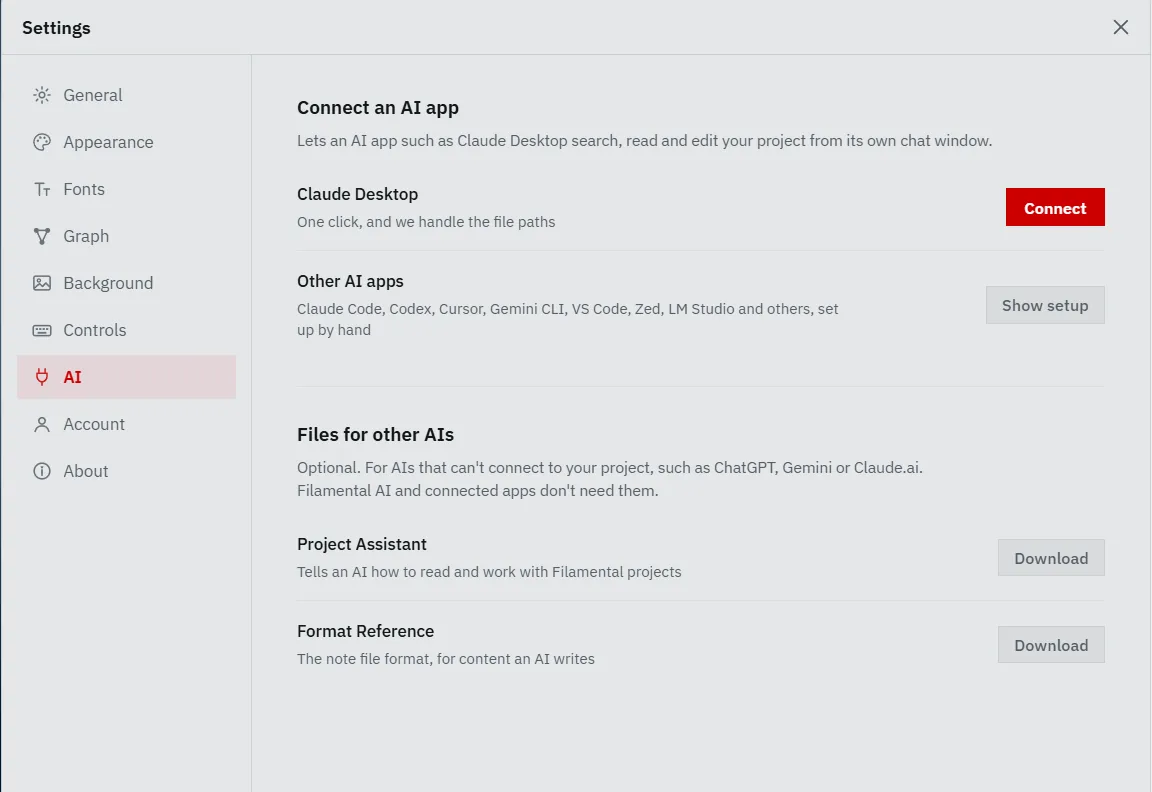
Open Filamental, then Settings from the hamburger icon at the top right, then AI, then Connect beside Claude Desktop. Restart Claude Desktop and it’s there.
There’s nothing to install and no key to paste. The MCP server ships inside Filamental, so the button only adds an entry to Claude’s own configuration file with the paths resolved for your machine, and the exact paths are on the same screen, under Other AI apps, if you’d rather do it by hand.
Claude then sees whichever space you last had open, and the connection follows when you change space, with no second restart.
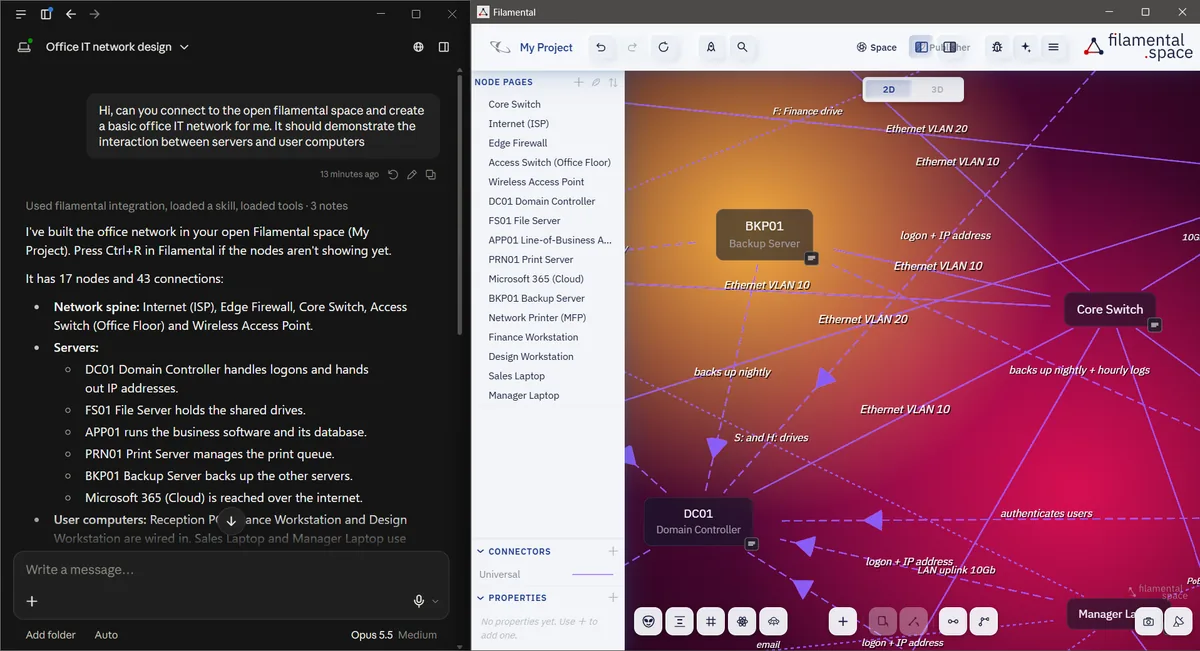
Talk a subject through the way you normally would, then ask for it as a structure, and Claude creates the nodes, writes the notes and draws the typed connections while the space builds in front of you, which is how you catch a misunderstanding while it’s still cheap.
Reading is the half that surprises people. Claude can search the space, open any node and follow connections in both directions, so it can see that a decision rests on an assumption that rests on a document somebody has since revised. That’s the difference between an AI that has your files and one that has your reasoning.
A briefing arrives the moment you connect, and Claude pulls the full skill guide and the file format specification only when a task calls for them. Both are published here word for word as they’re sent: the skill file and the file format reference. If you’re going to let software brief an AI on your behalf, you’re entitled to read what it says.
There’s no account and no telemetry anywhere in Filamental, so the only thing that leaves your machine is whatever Claude sends to Anthropic, as in any other conversation you have with it.
One prerequisite catches people out. The server reads the index Filamental builds, so the space has to have been opened in the app at least once on that machine. To read a folder somebody sent you, point the AI at the files directly, since a space is plain Markdown and no index is involved.
You need Claude Desktop, Node.js 22 or later, and Filamental v0.2.4 or later. Nothing else, and no separate download for the connector itself.
The one-click button is on Windows and macOS, where Claude Desktop runs, and a Linux machine reaches the same server through Claude Code. Or skip the install entirely: Filamental’s own chat window works with an API key from any of the major providers, or with a model on your own computer.
The connection is free on the Personal plan, which is free permanently with no account and no card, and it isn’t credited or reserved for a better tier. We aren’t in the middle of the call, so there’s nothing for us to charge for even if we wanted to.
Every install starts with everything switched on for fifteen days, then moves to Personal and stays there. Professional is $120 a year, or $12 a month, and keeps a big space whole, sends a finished structure to somebody who doesn’t have Filamental, and presents it.
Open Settings in Filamental, from the hamburger icon at the top right, go to AI and click Connect beside Claude Desktop, then restart Claude Desktop. Filamental writes the entry into Claude's own configuration file and resolves the paths itself, so there’s nothing to install, no key to paste and no JSON to edit. The one-click button is offered on Windows and macOS, which are the platforms Claude Desktop runs on.
Whichever one you last opened in Filamental. The connection follows the open space rather than being pinned to a folder, so switching to a different piece of work needs no reconfiguring and no second restart. Filamental doesn’t strictly have to be running for Claude to reach the files, although in practice you’ll have it open anyway.
No, because there are no servers in the path. The MCP server is a local process on your own machine talking to the Markdown files in your own folder, and the only thing that leaves is whatever Claude sends to Anthropic, exactly as it would in any other conversation you have with it. Filamental has no account, no sign-in and no telemetry of any kind, so there’s no channel for your work to leave by.
Both. It can search your nodes, follow connections in either direction, read the notes and properties on them, and it can create nodes, edit them and draw typed connections. Talking a subject through and then asking for it as a structure is the ordinary way people use this, and the result appears in the application as it is built.
A short briefing arrives the moment you connect, covering what nodes, categories and connectors are and the conventions that keep a structure readable. Beyond that it can pull the full skill guide and the complete file format specification on demand, but only when a task calls for them. Both of those documents are published on this website in full, word for word as they are sent, so you can read exactly what your AI is told.
Yes, and in two ways. A space is a folder of Markdown files, so you can hand over the folder itself and it opens in any editor, while anyone with an AI can point theirs at that same folder and have the whole structure read natively, relationships and directions included. For a recipient who would rather just look at it, Publisher turns the space into a link or a single HTML file that opens in an ordinary browser with the structure navigable inside it. Handing over the folder is free, and so is one published link at a time.
Nothing, on either side of ours. The MCP connection is free on the Personal plan, which is itself free permanently with no account and no card, and it isn’t metered or credited, because we aren’t sitting in the middle of it. You pay Anthropic for Claude exactly as you already do, and the only things Filamental charges for are ways of handing a finished structure to somebody else, beyond the one published link that's free.
Connect it, open an empty space, and say so in those words. What comes back is the shape of a thing you’ve just talked through, which is the fastest way to find out whether any of this suits you.