
Filamental works with the model you trust, and costs exactly the same with AI on or off. We have no AI of our own to sell you.
There’s no assistant in the corner of the window. Nothing suggests, nothing completes a sentence you’re still thinking about, and nothing is quietly reading over your shoulder. Open Filamental with no key and no connection, and Space Studio and Publisher Studio are complete as they are.
In a different version of this company you’d be meeting Philomena, the Filamental Agent, Filly to her friends, waving at you from the corner of the window. We didn’t build her.
You’re already paying for a very good model, you’ve already learned how to talk to it, and you’ve already shaped it to the way you work.
No branded agent
We could ship a chatbot like everyone else, but we both know what that is: somebody else’s model, marked up and sold back to you as a unique selling point, with the U doing a great deal of heavy lifting.
Model agnostic, and staying that way
Frontier or open weights, cloud or local. We’d rather you don’t feel tied to any one model.
Having options when it comes to AI is, and will be, important.
No credits and no token caps. We can’t upsell and meter what we don’t offer.
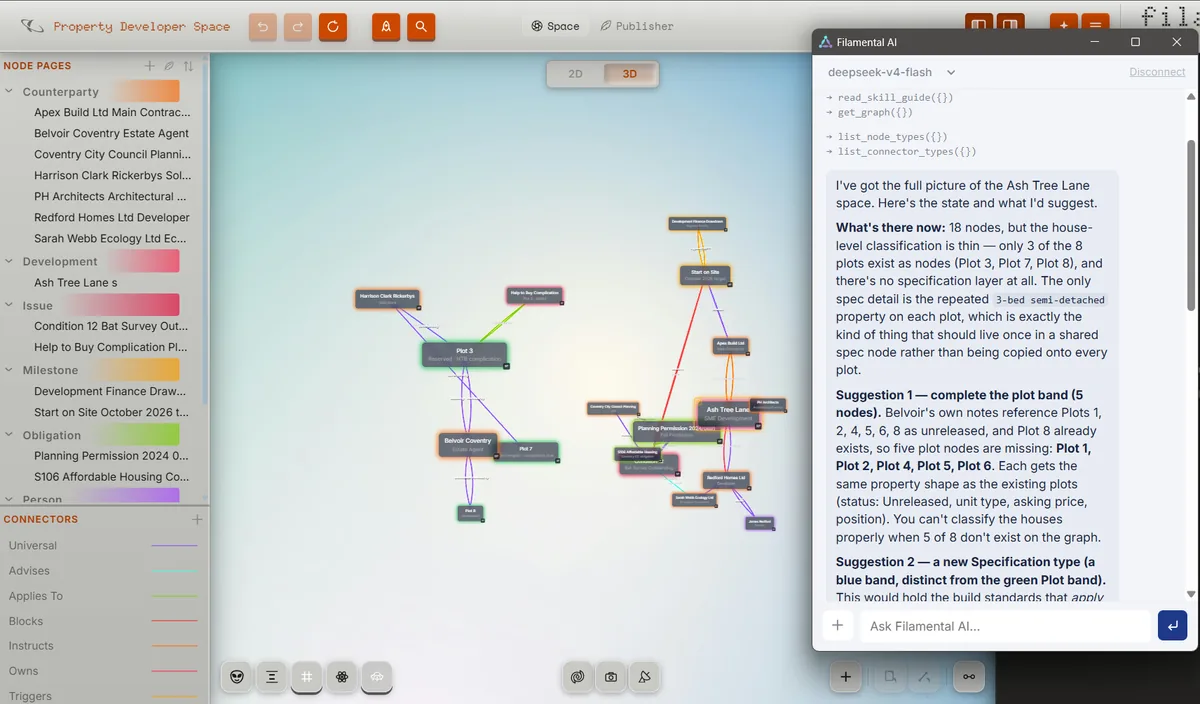
Talk a subject through in your usual chat window, then ask your AI to project it into Filamental. A minute later the structure’s standing in Space Studio, named and connected, and there’s no blank canvas to face.
Point Filamental at a folder of documents (or just one long one) and your AI reads them and builds a first draft of the structure. You approve the vocabulary and see a token estimate before it starts, and nothing in the folder changes.
Ask your AI to finish the parts you haven’t got to, such as notes on nodes you’ve moved past or the connector type you keep meaning to define. It works inside the space rather than writing a document about it.
Hand your AI the whole space and it gets your reasoning, not just your files: what depends on what, which way round, and how strongly. Ask how two things connect and it reads back the chain, the same route Pathfinder lights up on your screen.
What an AI hands back is usually a document, and documents flatten the thinking. A space keeps the categories and the dependencies, and since it’s a folder of Markdown, whoever you send it to can point their own AI at it and read it straight back.
None of that needs a translation layer, because there’s nothing to translate. A node is a Markdown file with its relationships written down in the front matter, which is a format every current model has read a great deal of.
You don’t do anything extra to get it. It’s incidental organisation, what’s left behind when you work the way you want to.
You’ll recognise yours on sight.
MCP
Claude Desktop, Claude Code, Codex, Cursor, Gemini CLI, VS Code, Zed, LM Studio, and anything else that speaks it. A live connection to the space you have open.
Your own API key. Any model.
Paste a key from the provider you pay, or run a model on your own computer through Ollama or LM Studio. The window always names the model you’re talking to, and we never see the key or the conversation.
Point it at the folder
Anything that reads files can read a space, because a space is files. The second brain route, for people who keep one.
Export for AI
The whole structure as one Markdown file, with a short summary at the top so the model knows the shape before it reads a note. Attach it to any chat box, including the one your employer gives you.
Mermaid
Build it in conversation, paste the code, and it becomes a real space with types you assign as it imports. If you know the word, you already know what this does.
Each of these has a page of its own: Claude Desktop, Claude Code, Codex, Cursor, Gemini CLI, VS Code, Zed, LM Studio, Obsidian, Mermaid and plain Markdown files, or all of them together.
Every one of these is free, on every plan, permanently. The full mechanics live in AI Connections & Prompting, where they belong.
Filamental’s own documentation is a Filamental space, one node per topic, written and kept up to date through the routes above. We use it because every other way of writing documentation is now the slower one.
That one space generates the Help section on this site and the help inside Filamental, so they can’t drift apart. Go and read it: you’re looking at the output.
Every route needs the model to understand a Filamental file first. That briefing is two plain text files, published here word for word as they’re sent: the skill file and the file format reference.
If Filamental is going to brief your AI on your behalf, you should be able to read exactly what it says.
Download it, never press the AI button, and nothing you’re using is diminished. It’ll be there if you change your mind, and it’ll still be free when you do.