
A node is a Markdown file with a block of YAML at the top holding its category, its properties and its relationships. That’s the whole storage design. Point Filamental at a folder you already keep notes in and it reads them, and if you delete the application tomorrow the work is exactly where you left it.
Open a folder of ordinary Markdown notes and Filamental adopts them. Every .md file that doesn’t already carry Filamental front matter becomes a node, with its name taken from the file, and any wikilink pointing at another note in the folder becomes a connection between the two. Nothing is moved, renamed or duplicated, and there’s no wizard to sit through.
It does write to those files. Adoption adds a block of YAML at the top of each one, carrying an identifier, a name, a category and the relationships it could work out. Your prose is untouched below it, but the files are modified, so take a copy first if you’re opening something irreplaceable. A file that already has front matter is left alone, and one whose front matter won’t parse is skipped rather than overwritten.
If your notes are an Obsidian vault there’s also a proper import that turns every resolvable wikilink into a real connection and reports the ones pointing at notes that don’t exist, which is a decent way to find out what a vault has been promising itself.
Most tools in this category keep the prose in one place and the structure in another, usually a database you can’t open. That’s what makes leaving one of them a project rather than a decision: the notes come out easily enough and the thing that made them useful doesn’t come out at all, which for a systems thinker is the half that matters.
Here the relationships are written into the front matter of the file they belong to, so a node carries its own connections and there’s nothing holding the graph together except the files themselves. There’s an index, and it sits in your machine’s application data rather than in the folder, which keeps it clear of anything syncing that folder between machines. It holds nothing the files don’t, so deleting it costs you nothing but the time to rebuild it.
The practical consequence is the one worth having. Copy the folder to a stick and it’s the whole of your work. Put it in version control and the history is legible. Hand it to somebody and they have everything, whether or not they ever install this.
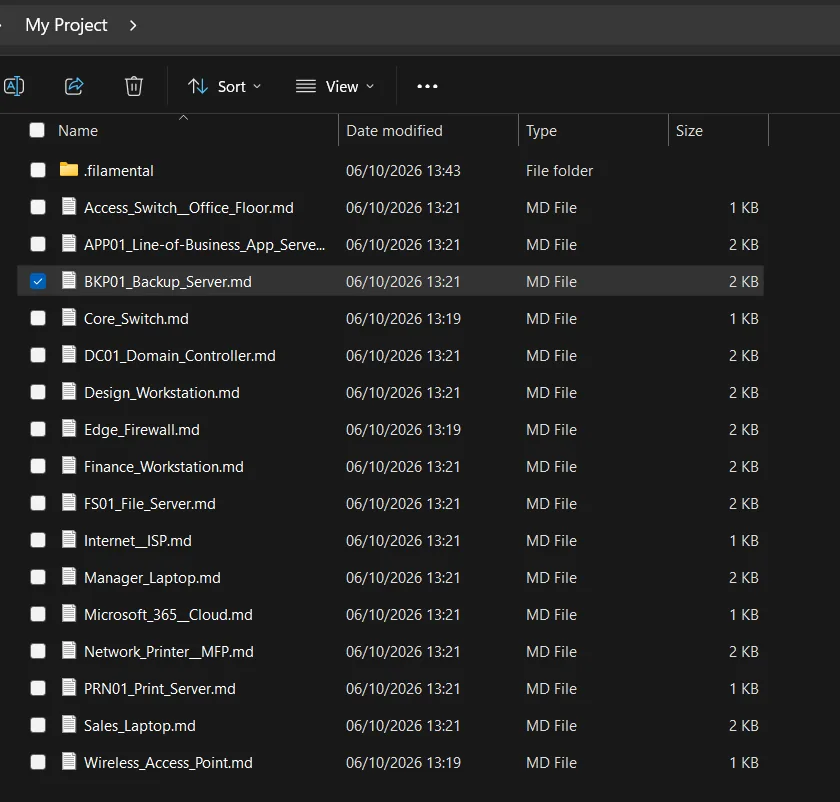
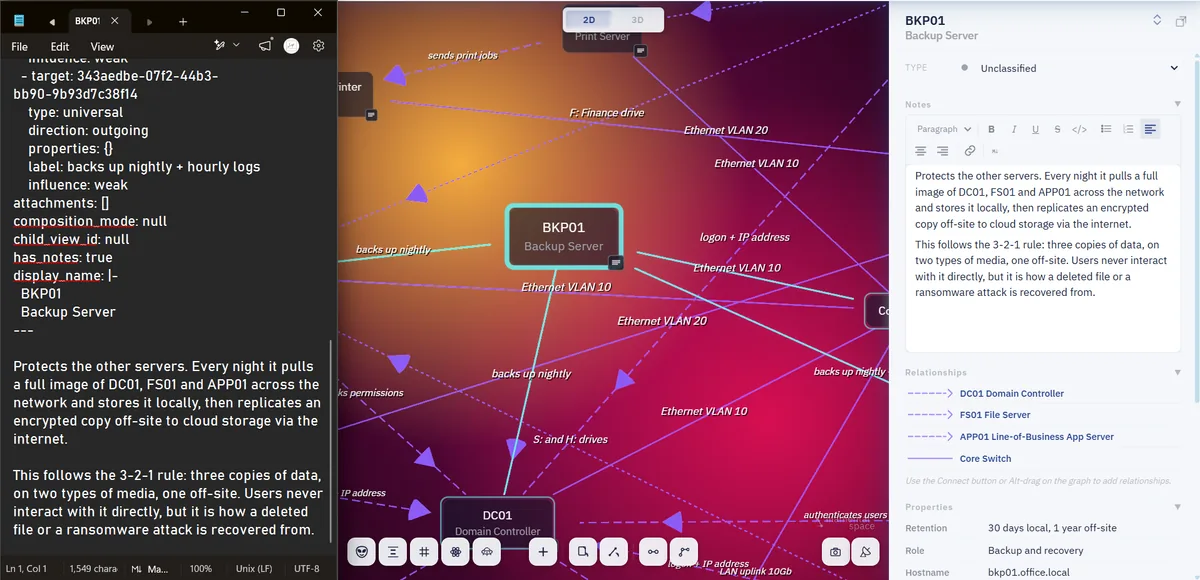
Because the relationships are in the files, an AI with filesystem access doesn’t need a connector, a permission dialog or an intermediate format to understand a space. Point Claude Code, or any agent working in your folders, at the directory and it can see what exists, what each thing is, and what depends on what in which direction.
Two documents make it fluent rather than merely literate, and both are published on this website in full: the skill file and the file format reference. With those installed the agent can write properly formed new nodes straight back into the folder, and they appear in the application when you refresh.
This is the route that turns a space into something an agent works inside rather than visits through a window, and it’s the honest recommendation for anybody who has already built that habit.
Notes are Markdown, and everything else stays exactly what it is. Drag a spreadsheet, a photograph, a PDF or a CAD drawing onto the node it belongs to and it attaches, then opens in whatever normally opens it. Copy or move is offered on every drop, so moving files in actually makes your folder tree smaller rather than adding a second copy of everything.
A file can also be dropped in as a node in its own right, which is the right answer when the document is the thing rather than an attachment to it.
Reading a folder, adopting notes, attaching files, building the structure and letting an agent read it are all free on the Personal plan, permanently, with no account and no card. Professional is $120 a year, or $12 a month, and keeps a big space whole, hands a finished structure to somebody who doesn’t have Filamental, and presents it.
Markdown with YAML front matter, one file per node, in a folder you choose. The prose is the body of the file and the structure lives in the front matter, which is where a node's category, its properties and its relationships to other nodes are written. There’s no proprietary container and no database holding the content, so the folder is the whole of your work and it opens in any editor you like.
Yes. Point Filamental at the folder and it adopts any .md file that doesn’t already carry Filamental front matter, which means an ordinary folder of notes becomes a set of nodes without an import step. A file whose front matter came from another app keeps every field it already has, and a file whose front matter can’t be read is skipped rather than overwritten, so a folder with a mixture is safe to open.
It adds YAML front matter to the top of any Markdown file that doesn’t have it, carrying an identifier, a name, a category and the relationships it can work out. Your prose isn’t touched and nothing is moved, renamed or copied, but the files are written to, which is worth knowing before you open something irreplaceable. Take a copy first if that matters, exactly as you would with any other tool.
There’s an index, and it lives in your machine's application data rather than in the folder, which keeps it out of the way of anything syncing that folder to another machine. It holds nothing that isn’t already in the files, so deleting it costs you nothing but the time to rebuild it. The Markdown files remain the single copy of your work.
Yes, and no connector is needed for it. Anything with filesystem access can read the folder and see the whole structure, since the relationships are written into the front matter of the files themselves rather than held somewhere only Filamental can reach. Install the skill file and the file format reference alongside it and the agent can write properly formed new nodes back into the folder too.
Nothing at all, because they were never anywhere else. You’re left with a folder of Markdown files that open in any editor, with a block of readable YAML at the top of each one that any other tool can ignore. There’s no export to run before you go and no account to close, and if you delete the application tomorrow the work is exactly where you left it.
A copy, because it writes front matter into what it adopts. Ten minutes with your own material tells you more than any amount of reading about somebody else’s.