
Talk a subject through with whatever AI you already have, ask for it back as a Mermaid flowchart, and paste the code in. A minute later you’re standing in a structure with everything named, sorted into categories and connected, which is a considerably better place to start than an empty space.
In the bottom toolbar, click the plus button, choose Insert Mermaid diagram, paste the code, click Next, choose a node type for each shape and click Create. The only part that has to be exact is the code itself, so copy and paste rather than retyping it.
Node types are assigned in the wizard as it imports and can be changed afterwards from any node, so nothing here has to be right the first time. It’s worth not agonising over the vocabulary at this stage, since the structure is far easier to think about once it’s in front of you than while it’s still a list of names.
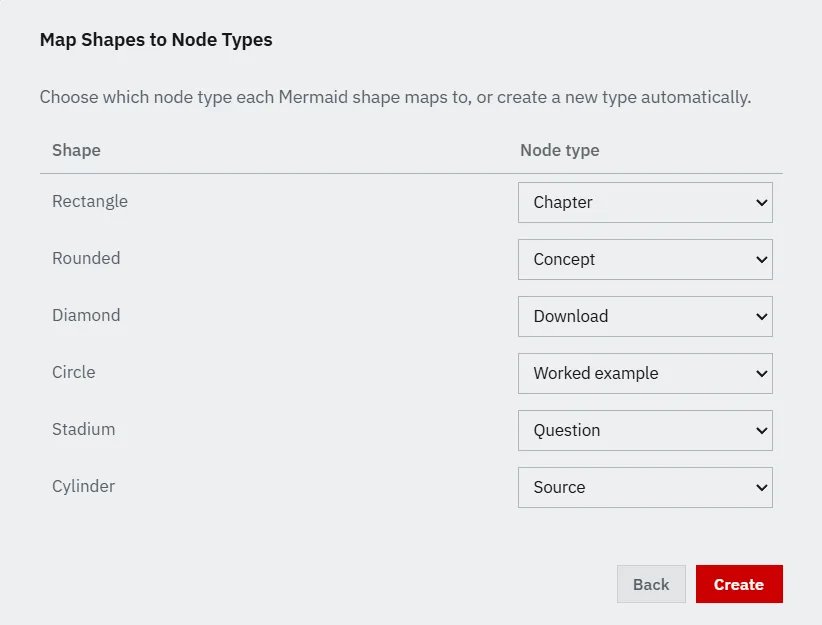
Each shape in the diagram maps to a node category, which you pick in the wizard, so a flowchart that draws decisions as diamonds and systems as cylinders arrives already sorted into colours rather than as one undifferentiated pile. Anything written on an arrow is kept as the label on the connection.
The connections themselves arrive untyped and undirected, on purpose. A flowchart knows that two things are joined and it doesn’t know whether one supersedes the other, depends on it or rules it out, so the import declines to guess. Typing those is the work (the systems thinking part), and it’s the work that produces something a diagram could never have told you.
Filamental reads Mermaid flowcharts, declared with graph or flowchart in any direction, with the usual arrow forms including chained and labelled edges. Six node shapes are recognised: rectangle, rounded, circle, diamond, cylinder and stadium. Subgraph, style and class lines are skipped rather than rejected, so a diagram carrying them still comes in cleanly.
Every other live route on this site needs something installed, configured or authorised. This one needs an assistant capable of writing text into a window, which means the locked-down chatbot your employer provides can build you a structure without anybody having to approve a connector, review a tool or sign anything.
It’s also the route with the least to go wrong. There’s no server, no key, no protocol version and no Node runtime, so nothing about it can break when somebody else ships a release, and it works identically on a machine with no network access at all.
When you do want the live version afterwards, the skeleton you imported this way is a perfectly good starting point for it. Import the shape here, then let a connected model write the notes onto the nodes.
First, once you’ve talked the thing through: ask for it as a Mermaid flowchart you can import into a knowledge graph tool, naming flowchart TD and arrow syntax so the output is the shape the importer reads. Most assistants produce usable code from a request in roughly those words, with no further coaching.
Then ask for two to four sentences of notes on each node, so you know what each one represents. Those go into the notepad on the matching node, which is where the substance of a space actually lives, and it’s the step people skip and regret.
The help topic carries the exact wording for both, along with a version that converts a whole conversation rather than a subject.
Free on the Personal plan, which is free permanently with no account and no card, as is every other route to an AI on this site. The paid tier is $120 a year, or $12 a month and buys sending a finished structure to somebody who doesn’t have Filamental, or presenting it to them.
In the bottom toolbar, click the plus button, choose Insert Mermaid diagram, paste the code, click Next, choose a node type for each shape and click Create. The only part that has to be exact is the code itself, so copy and paste it rather than retyping. Node types can be assigned in the wizard as it imports, and changed afterwards from any node, so there’s nothing you have to get right first time.
Flowcharts, declared with graph or flowchart in any direction. Six node shapes are recognised, being rectangle, rounded, circle, diamond, cylinder and stadium, along with the usual arrow forms including chained edges and labelled ones. Subgraph, style and class lines are skipped rather than rejected, so a diagram carrying them still imports cleanly.
Each shape maps to a node category, which you choose in the wizard, so a diagram drawing decisions as diamonds arrives with those decisions already sorted into their own colour. Any label written on an arrow is kept on the connection. The connections themselves arrive untyped and undirected on purpose, because the diagram knows two things are related and doesn’t know whether one supersedes the other.
Yes, and it’s the reason this route exists. Nothing has to be installed, connected or authorised on the AI's side, since all it has to do is write Mermaid code into a chat window, which almost every assistant will do from a plain request. You copy the code out and paste it into Filamental, so the locked-down chatbot your employer provides is perfectly capable of building you a structure.
Talk the subject through the way you normally would, then ask for it as a Mermaid flowchart you can import into a knowledge graph tool, naming flowchart TD and arrow syntax so the output is the shape the importer reads. Asking afterwards for two to four sentences of notes on each node gives you the substance to paste into each one, which is the other half of the job.
No. It’s free on the Personal plan, which is free permanently with no account and no card, along with every other route to an AI on this site. The paid tier, at $120 a year or $12 a month, adds shared links, updates to a link already sent, the HTML download and presenting.
No connector, no key and nothing to configure. Paste it in, and see whether the thing you were describing has a shape you recognise.